
In this guide 8 sections
Read-aloud audio is available in supported browsers.
Can you get paid for GTA 6 clips on X?
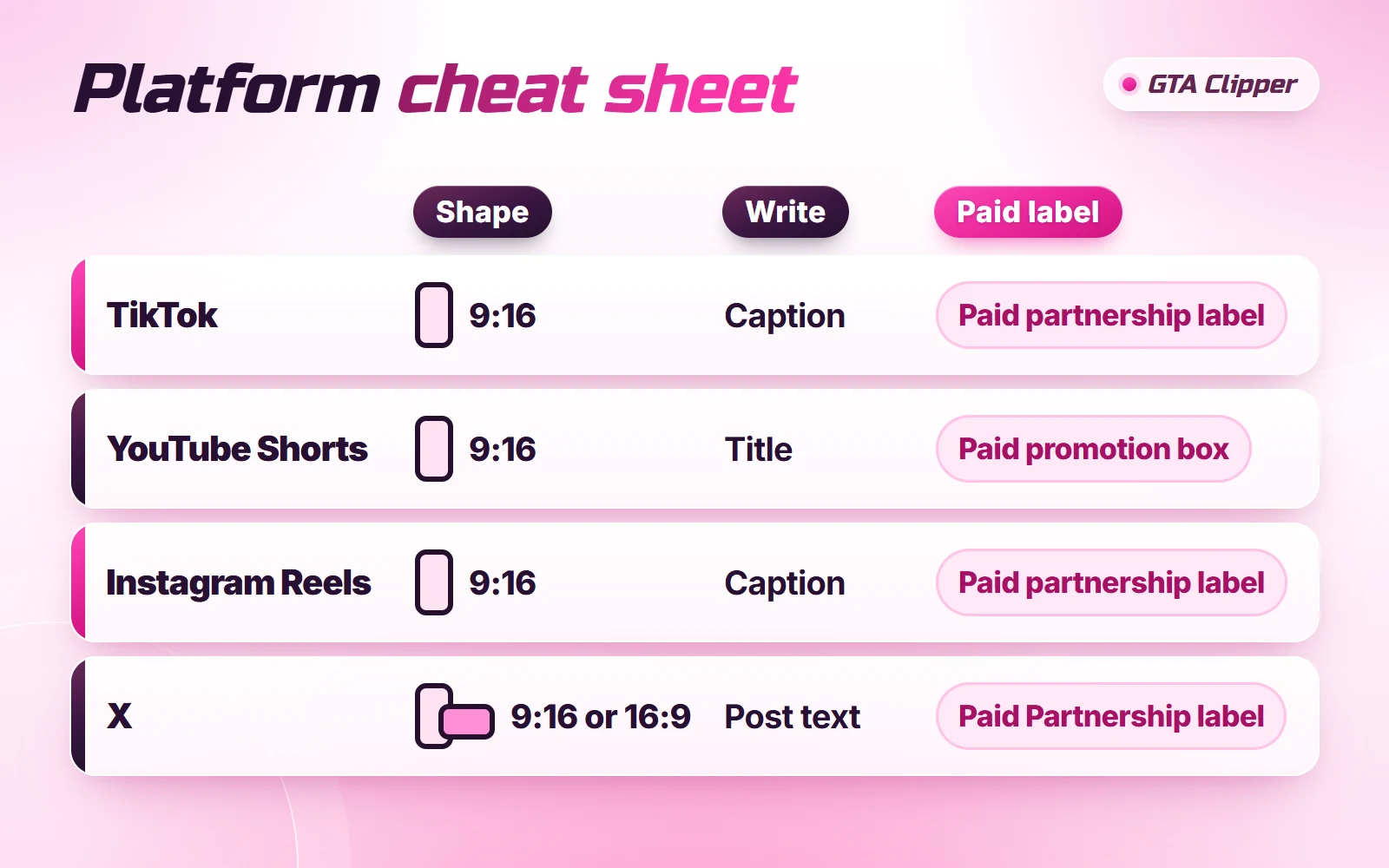
Yes, if the campaign brief lists X. Clipping campaigns can run on TikTok, YouTube Shorts, Instagram Reels and X, and each brief says which ones count. A clip on a platform the brief leaves out earns nothing.
The deal is the same as on other apps. You post from your own account, submit the link, and get paid per 1,000 views on approved clips. The whole model is covered in GTA 6 clipping explained. To see what is running, check the GTA 6 campaigns page.
What changes on X is the shape of the video, the words above it, the replies and the way views are counted.
Should GTA 6 clips on X be wide or vertical?
Both work. X plays video inside the timeline, between text posts, and its help page says videos there autoplay. A wide 16:9 clip sits well in that feed and keeps the whole game screen. A vertical clip takes up more of a phone.
| Clip | Best shape on X | Why |
|---|---|---|
| A chase or a race | Wide 16:9 | You can see the road and what is coming |
| A stunt or a long jump | Wide 16:9 | The run-up and the landing both fit |
| A streamer reaction with facecam | Vertical 9:16 | The face is big enough to read |
| A funny NPC moment up close | Either | Use the file you already made |
If the brief asks for one shape, use that one. If you already cut a vertical version for other apps, it is fine to post it here. Need to recut a clip for a wider frame? Follow these GTA 6 clip editing steps.
How long can a video on X be?
X's help page on videos says accounts without a paid subscription can upload videos up to 140 seconds long. The file can be up to 512MB. Paid subscribers can post longer videos.
You will not need the room. A good clip usually runs 15 to 40 seconds. Show one moment and stop.
What should the post text say?
On X the text sits above the video, and people read it first. It does the job that on-screen hook text does on TikTok.
- Write one line. Say what is about to happen without giving away the ending.
- Start with the brief's disclosure if you are paid, for example "#ad".
- Tag the streamer or owner if the brief asks.
- Use one or two hashtags, not ten.
- Stay honest. Do not call normal gameplay a leak.
Three examples:
- "#ad He had a clear road and still found the only pole."
- "#ad Four cop cars, one bridge, no brakes."
- "#ad The NPC's reaction is the best part of this."
How do replies help a GTA 6 clip on X?
On X the replies sit right under the post, and people read them. Use that space.
- Add context in your first reply. Credit the stream, or say what happened next.
- Answer people. Someone who asks a question and gets an answer may come back for your next clip.
- Keep it friendly. Arguments under a paid clip look bad for the campaign owner.
Two things to avoid. Do not paste your clip under big accounts' posts. That is spam, and it makes the campaign look bad. And do not hide the disclosure in a reply. The FTC says a disclosure in the comments is too easy to miss.
Clipping a streamer? Our guide on clipping GTA 6 streams covers credit and permission.
How are views counted on X?
Every post on X shows a public view count next to the analytics icon. X's help page explains what goes into it:
- Anyone logged in who sees the post counts as a view, wherever they see it.
- Looking at your own post counts too.
- One person can count more than once.
- Posts embedded on other websites do not add views.
- Community posts do not show a view count.
Two takeaways. Post campaign clips to your main timeline, rather than just inside a Community. And remember that this number counts people who saw the post, not people who watched to the end.
A campaign pays on the views it counts for approved clips, up to the cap. For example, 30,000 views at $0.50 per 1,000 is $15 before fees. The brief sets the rate for X. There are more sums in our guide to GTA 6 clipping CPM and caps.
How do you label a paid post on X?
X's Paid Partnerships policy says a paid post must have the Paid Partnership disclosure turned on. You find it in the Content Disclosure settings when you write the post. X then adds the label for you.
X also says you are responsible for following advertising law, and it names the FTC's rules. If you skip the label, X can make you remove the post. Repeat cases can lead to suspension.
So do both. Turn on the label, and start the text with the brief's wording. Our guide on paid clip disclosure rules has good and bad examples.
How do you post and submit a clip on X?
- Check that the brief lists X.
- Upload the video file to a new post. A link to the clip on another app does not count.
- Write the post text and turn on Paid Partnership.
- Post from your own account.
- Copy the post link and submit it. Content Rewards gives you 30 minutes from the moment you post.
- Do not delete or edit the post afterwards. Both are common reasons for rejection.
The steps before and after this, from accounts to payout, are in GTA 6 clipping step by step.
Read next: GTA 6 Clipping Pay: CPM, Caps and Real Examples · Do GTA 6 Clips Need #ad? Disclosure Rules · How to Clip GTA 6 Streams (Twitch, Kick, YouTube)