In this guide 9 sections
Read-aloud audio is available in supported browsers.
How do you make money clipping GTA 6?
The short version: find a campaign, make clips that follow its rules, post them and hand in each link. When a clip is approved, it earns money for every 1,000 views, up to a cap per clip.
If the idea is new to you, read what GTA 6 clipping is first. This page is the to-do list. It has nine steps:
- Set up your accounts.
- Join the Discord.
- Find a campaign.
- Read the brief.
- Make the clip.
- Post it.
- Submit the link within 30 minutes.
- Wait for review.
- Get paid.
What accounts do you need first?
Set up three things before you clip anything.
- A social account. Campaigns can run on TikTok, YouTube Shorts, Instagram Reels and X. Pick one to start. You post from your own account, so give it a name and bio that say it is a GTA 6 clips page.
- A Content Rewards account. Content Rewards is the platform that hosts GTA Clipper's campaigns. You join a campaign and submit your links there.
- A bank account. On Content Rewards, you withdraw your pay to a bank account. The minimum withdrawal is $1.
You should never pay to join a campaign. If someone asks for money up front, walk away.
How do you find and join a GTA 6 clipping campaign?
Start in two places.
First, join the GTA Clipper Discord. It is the community for clippers, and the place to ask a question before you post.
Second, open the GTA 6 clipping campaigns page. It sends you on to GTA Clipper's page on Content Rewards. Campaigns open and close, so that is where you see what is open right now.
Some campaigns on Content Rewards are open to anyone. Others want you to apply first. The campaign page tells you which.
What should you check in the campaign brief?
The brief is the rule sheet. On Content Rewards, most rejections come from something written in it. Read it twice and write down these six things:
| Check | What to look for |
|---|---|
| Platforms | Which apps count. A clip on the wrong app is rejected. |
| Footage | What you may clip, and what is banned. |
| Tags and wording | Hashtags, mentions and the disclosure line, such as "#ad". |
| Rate | The pay per 1,000 views. |
| Cap | The maximum payout per clip. |
| Budget | How much is left. A campaign can only pay out what is in its budget. |
Do not skip the footage line. A paid clip is commercial, so the campaign owner decides what you can use. This page on what GTA 6 footage is allowed explains why. Paid posts also need a clear label, and you can see where the #ad label goes on each platform.
How do you make a clip that gets approved?
Keep it simple.
- Pick one moment: a chase, a crash, a jump, a funny NPC moment or a big reaction.
- Cut it short. Aim for 15 to 40 seconds.
- Make it vertical: 9:16, at 1080 × 1920.
- Show the best part early, so people do not swipe away.
- Add any on-screen text the brief asks for.
Make every clip yourself. Reused content is a common reason for rejection, so do not download and repost someone else's clip. New to editing? Follow these steps to edit GTA 6 clips.
How do you post and submit the clip?
Post the clip from your own account, on a platform the brief names. Put the required tags and the disclosure in the caption before you hit post.
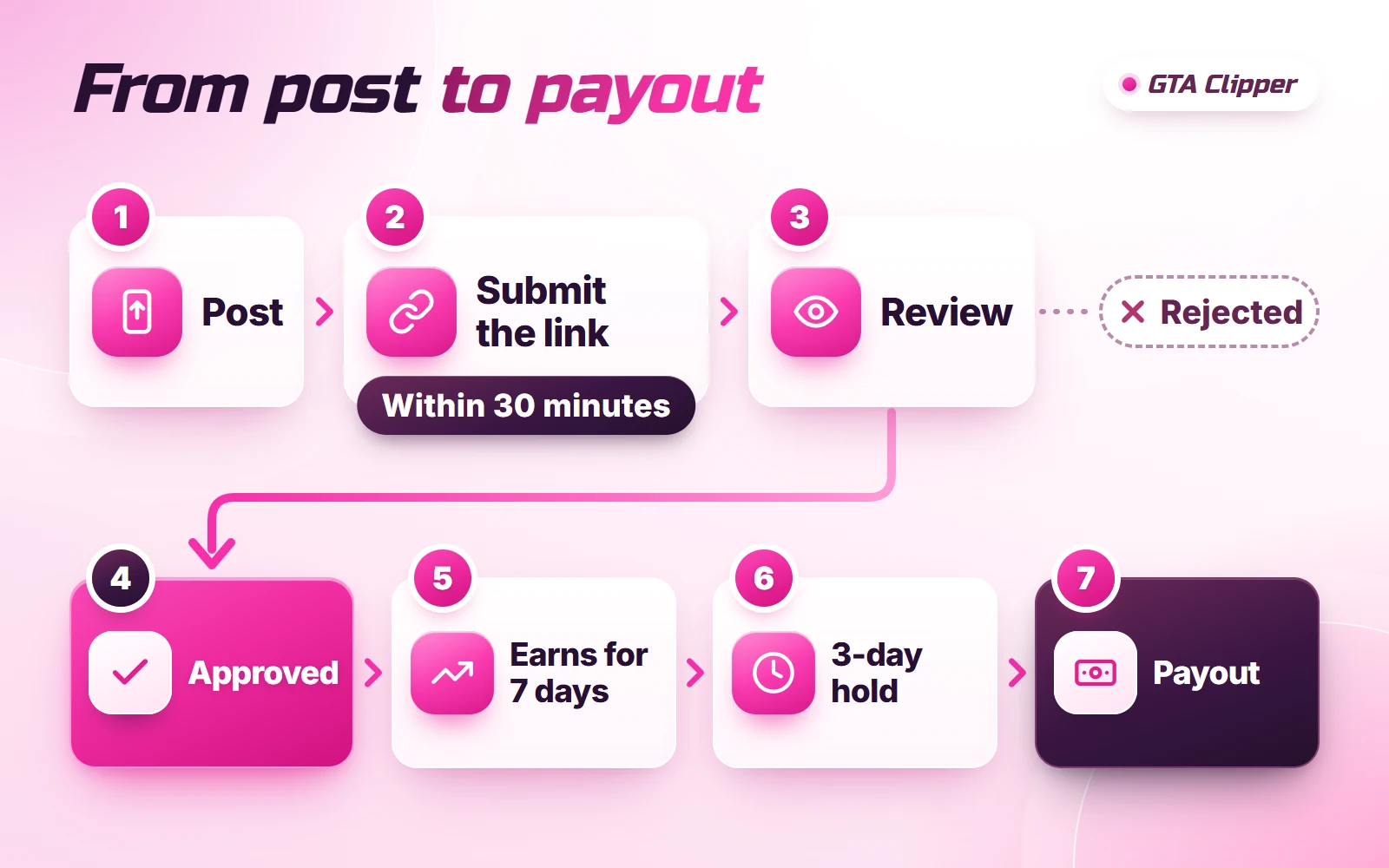
Then submit the link fast. On Content Rewards, you submit within 30 minutes of posting. A late link may not count, so do it right away:
- Post the clip.
- Open the post and copy its link.
- Paste the link into the campaign on Content Rewards.
- Check that your submission shows up.
After that, leave the post alone. Editing or deleting it after you submit is a common reason for rejection.
What happens while your clip is reviewed?
A person checks every submission. On Content Rewards, that is the brand or its campaign manager. Nothing is approved automatically.
The common rejection reasons are:
- the wrong platform
- missing tags or disclosure
- reused content
- editing or deleting the post after you submit
If a clip is rejected, the note says why. Fix the cause and get the next one right. To see the review from the other side, read how GTA 6 clips get approved.
When do you get paid?
On a Content Rewards CPM campaign, an approved clip earns on its views for 7 days. A 3-day hold follows. After that, you can withdraw the money to your bank.
Content Rewards keeps 10% of what you earn as its fee. So a clip that earns $20 leaves you $18.
Views are never guaranteed, and some clips will earn very little. Try your own numbers in the CPM calculator for clips, or read the full breakdown of CPM rates and caps.
What should you do after your first payout?
Look at what worked. Which clip got the most views? What did its first two seconds show? Make more clips like that one.
Keep a simple log of every clip too: the post link, the time you posted, the time you submitted and the result. If a payout looks wrong or a clip is rejected, that log is how you sort it out.
Read next: GTA 6 Clipping Pay: CPM, Caps and Real Examples · GTA 6 Clipping Jobs: 3 Ways to Get Paid