
In this guide 9 sections
Read-aloud audio is available in supported browsers.
How much does GTA 6 clipping pay?
You are paid a set rate for every 1,000 views your approved clips get. Example rates shown on Content Rewards are $0.50, $0.75 and $1 per 1,000 views. At $1, a clip with 100,000 views earns $100 before fees.
There is no wage and no fixed amount. Your pay comes from four numbers: your views, the campaign's rate, its cap per clip and the platform fee. This page works through each one. If the model is new to you, read how GTA 6 clipping works first.
GTA Clipper has no single pay rate. Each campaign sets its own, so check the open campaigns page to see what is open and what it pays.
What does CPM mean in clipping?
CPM is the price of 1,000 views. It is short for "cost per mille", and mille is Latin for a thousand. Most clipping campaigns use it. On Content Rewards, the other pay models are per post, retainer and pool. If you would rather be paid a flat fee, look at the other kinds of clipping jobs.
The sum has three steps:
views ÷ 1,000 × rate = pay
- Take the views on your approved clip. Say 50,000.
- Divide by 1,000. That gives 50.
- Multiply by the rate. At $1.00, that is $50.
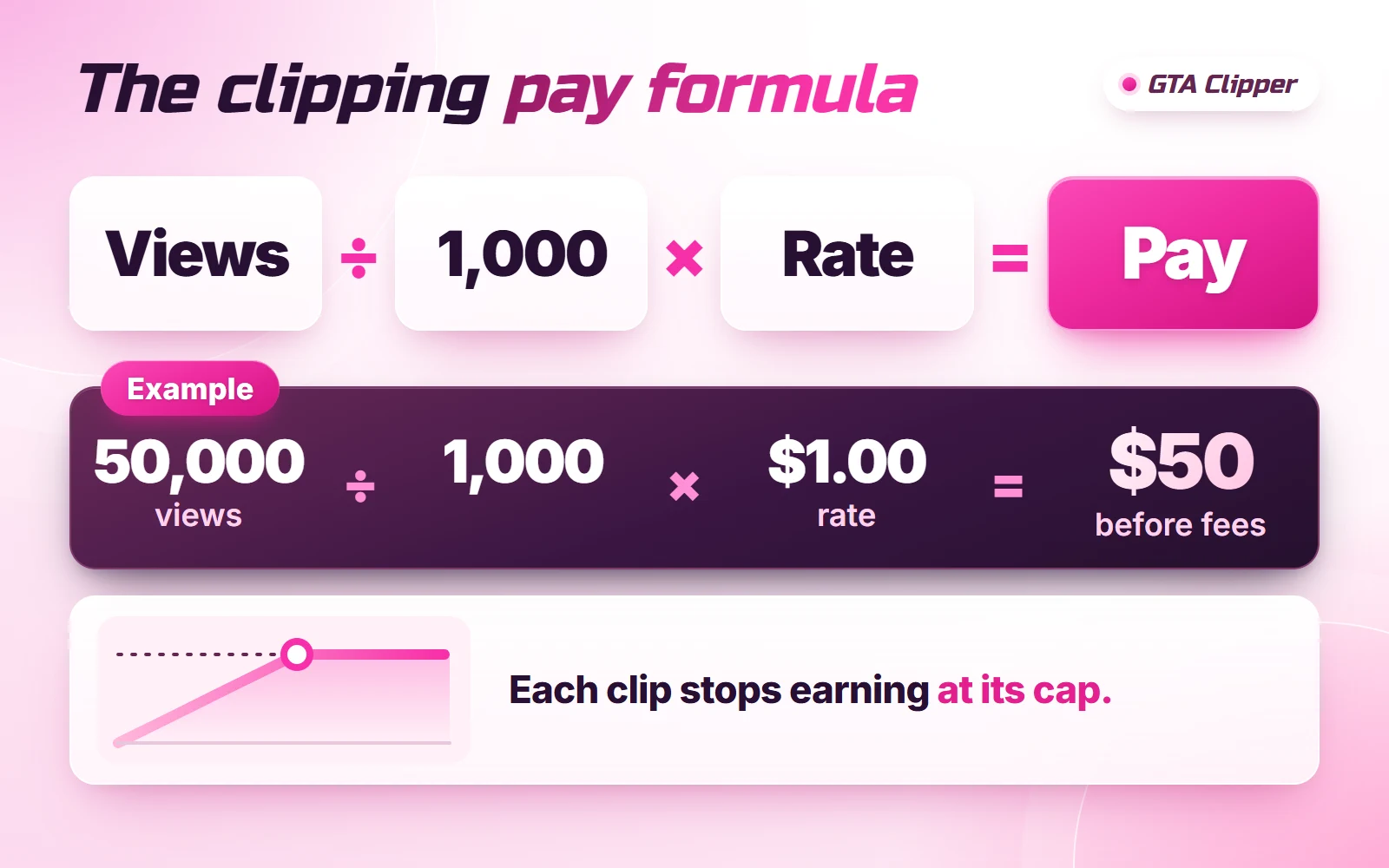
To skip the math, type your numbers into the clipping earnings calculator.
What does a clip earn at different view counts?
The rate matters as much as the views. The same 100,000 views is $50 at $0.50 and $100 at $1.
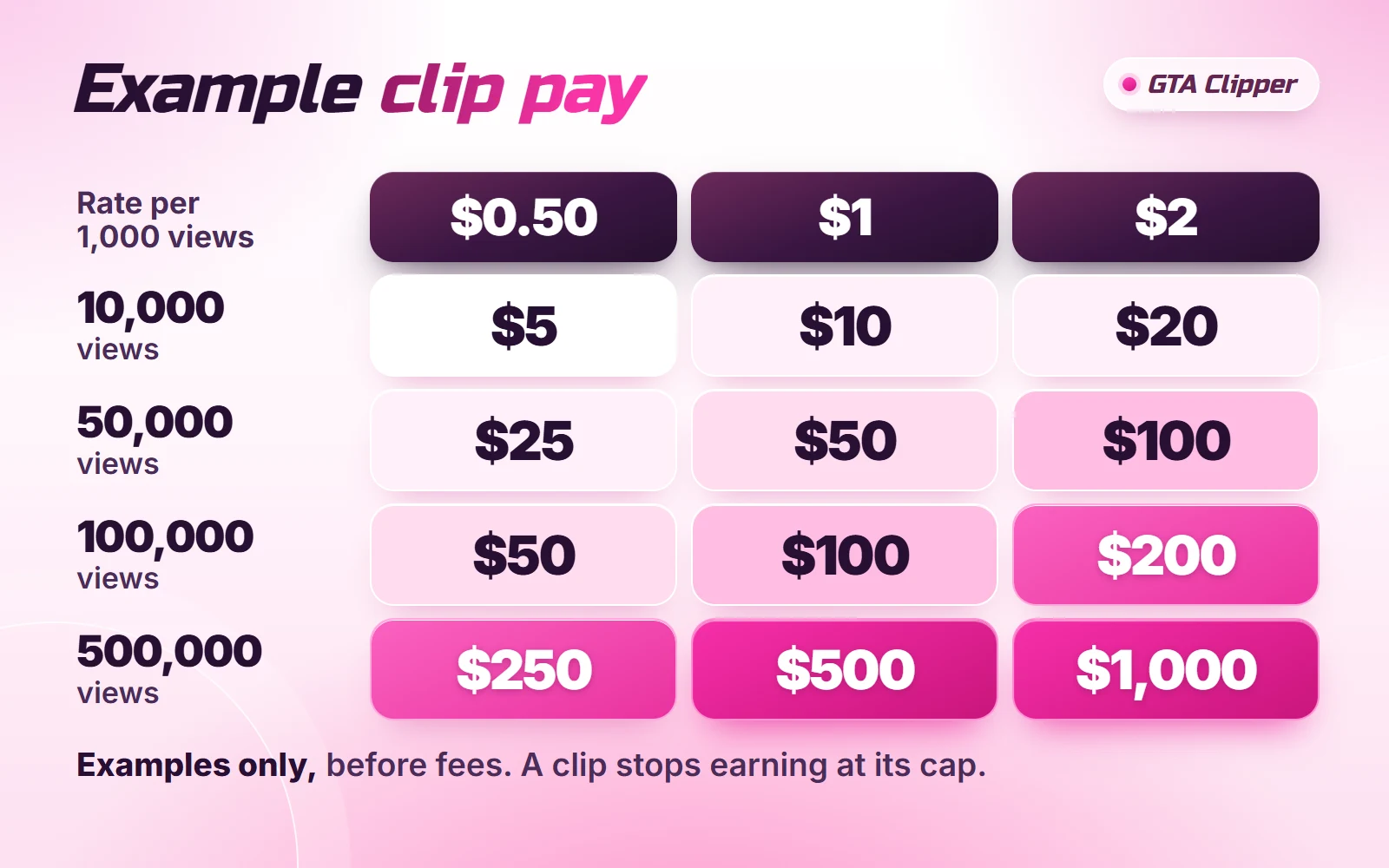
Three sums from that picture:
- 10,000 views at $0.50 is $5.
- 50,000 views at $1 is $50.
- 500,000 views at $2 is $1,000.
All of these are before caps and fees. The next sections show why the real number is often lower.
What is a maximum payout per clip?
It is the most one clip can earn, however many views it gets. On Content Rewards, each campaign sets this cap and shows it on the campaign page. A clip that hits the cap keeps getting views but stops earning.
Here is one public example. In November 2026, a GTA 6 music campaign on Content Rewards paid $0.70 per 1,000 views. It had a $2 minimum payout and a $35 maximum per clip. Another company ran it, not GTA Clipper.
| Views on one clip | Sum at $0.70 | What the clip pays | After the 10% fee |
|---|---|---|---|
| 10,000 | $7 | $7 | $6.30 |
| 50,000 | $35 | $35 (cap reached) | $31.50 |
| 200,000 | $140 | $35 | $31.50 |
| 1,000,000 | $700 | $35 | $31.50 |
The cap is reached at 50,000 views. Every view after that pays nothing.
Why is a viral clip capped?
A campaign has a fixed budget. Without a cap, one huge clip could use most of it, and the owner would get one video instead of many. The cap spreads the money across more clips and more clippers.
This changes how you should work. In the example above, one clip with 1,000,000 views pays $35. Ten clips with 50,000 views each pay $350. Steady clips that reach the cap beat one viral hit.
So find the cap point before you start. Divide the cap by the rate, then multiply by 1,000. That is the view count where a clip stops earning: $35 ÷ $0.70 × 1,000 = 50,000 views.
What is a minimum payout?
Some campaigns set one. On Content Rewards, it is the amount a clip must earn before it pays.
In the example above, the minimum was $2. At $0.70 per 1,000 views, a clip needs about 2,900 views to reach it. A clip that stops at 1,000 views has earned $0.70, which is under the minimum.
What fees come out of your pay?
Content Rewards takes a 10% fee from creator earnings. To find what you keep, multiply by 0.9.
- $10 earned leaves $9.
- $35 earned leaves $31.50.
- $50 earned leaves $45.
Your bank transfer can add a cost of its own. Content Rewards says transfer fees and arrival time depend on the payout method you choose.
One fee is not yours to pay. Campaign owners pay GTA Clipper a 20% campaign fee on top of the creator rewards budget. It does not come out of clipper pay. Owners can see what a campaign costs.
When do you get the money?
On a Content Rewards CPM campaign, there are three waits:
- Review. A person approves or rejects the clip. Only approved clips are paid. See how clip review works.
- 7 days of earning. The clip earns on its views for 7 days after approval.
- 3 days on hold. Then the payout is held for 3 days.
After that you can withdraw, once you have $1 or more, to a bank account.
The 7 days matter. A clip that takes off three weeks later does not earn more, because its earning window has closed.
How do you estimate your own pay?
Use your normal numbers, not your best clip.
- Take the average views of your last ten clips.
- Divide by 1,000 and multiply by the rate.
- If the answer is over the cap, use the cap.
- Multiply by 0.9 for the fee.
- Multiply by the number of clips you can make in a week.
For example, 8,000 average views at $1 is $8 a clip, or $7.20 after the fee. Five approved clips a week would be $36. Views are never guaranteed, so treat that as a guess, not a promise.
Ready to try it? Follow the steps to get paid for clips.
Read next: How to Make Money Clipping GTA 6 (Step by Step) · GTA 6 Clipping Jobs: 3 Ways to Get Paid