In this guide 8 sections
Read-aloud audio is available in supported browsers.
What is GTA 6 clipping?
GTA 6 clipping is cutting one good moment out of GTA 6 footage and posting it as a short vertical video. The moment can be a chase, a crash, a jump or a funny NPC moment.
You can clip for fun. You can also clip for pay, through a clipping campaign. In a campaign, someone who wants more viewers sets a budget and a list of rules. You post clips that follow the rules. Each approved clip then earns a set amount for every 1,000 views.
GTA 6 is made by Rockstar Games. It is out November 19, 2026 on PlayStation 5 and Xbox Series X|S. No PC version has been announced.
How does GTA 6 clipping work?
A paid clip goes through five steps.
- Read the brief. The brief is the campaign's rule sheet. It says which footage you can use, which apps count and what the caption must say.
- Make the clip. Cut one moment into a short vertical video.
- Post it. Upload it from your own account, on a platform the brief names.
- Submit the link. GTA Clipper hosts its campaigns on Content Rewards. There, you submit the link within 30 minutes of posting.
- Get paid per 1,000 views. A person reviews every clip. Nothing is approved automatically. If your clip passes, it starts earning on its views.
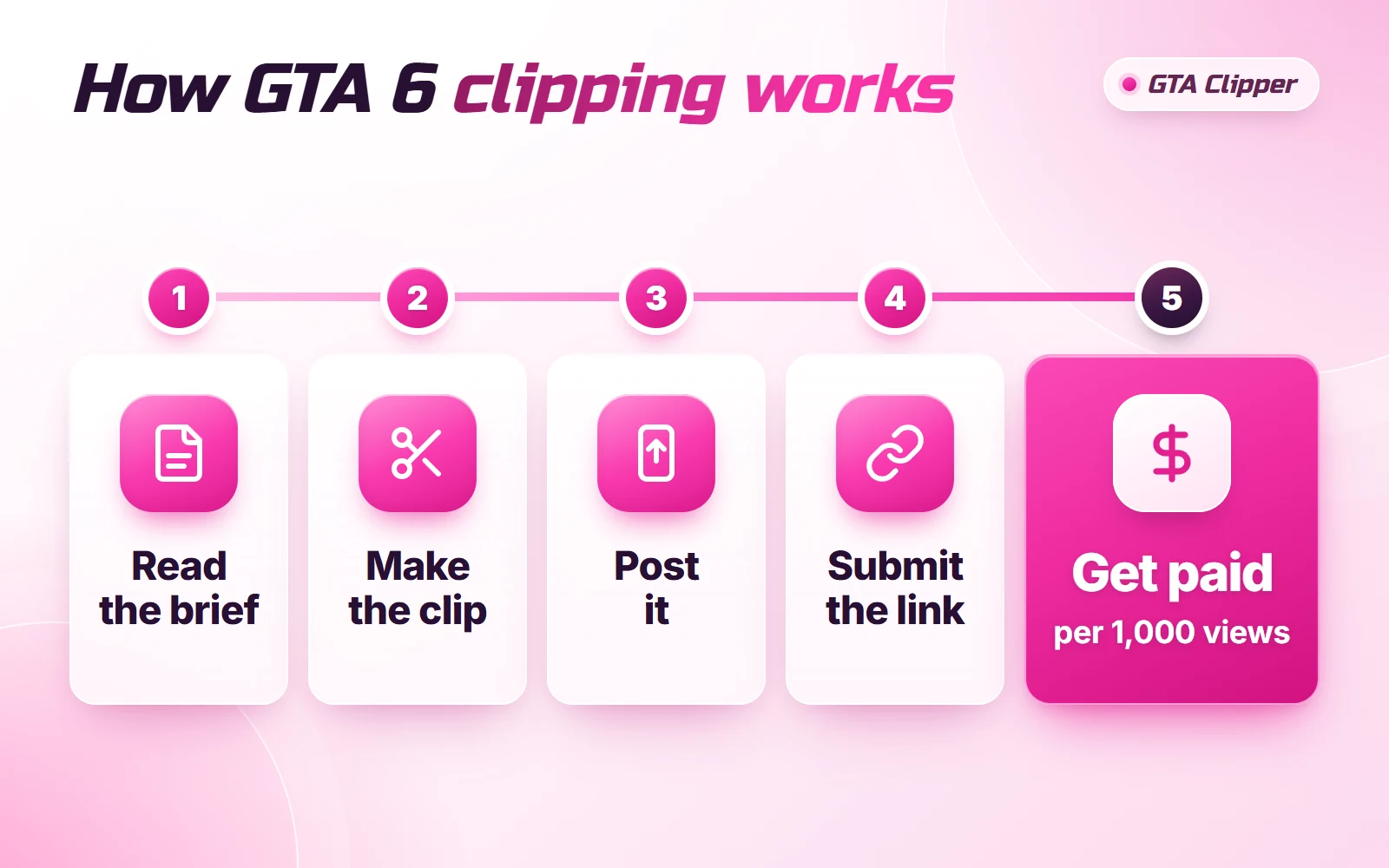
Each step has small details that decide if you get paid. The steps to make money clipping cover them one by one.
Who pays for GTA 6 clips, and why?
Campaign owners pay. They are streamers, YouTubers, brands and GTA RP server owners who want more people to see their name.
One channel can only post so much. In a campaign, many clippers post the owner's best moments on their own accounts, so those moments reach many more feeds. The owner pays only for views on approved clips.
GTA Clipper runs these campaigns. For owners, the creator rewards budget starts at $1,000, plus a 20% campaign fee. That makes the smallest campaign $1,200. The pricing page shows what a clipping campaign costs.
GTA Clipper is not affiliated with Rockstar Games or Take-Two Interactive.
How much does a GTA 6 clip pay?
Most clipping campaigns pay by CPM, which means a rate per 1,000 views. The sum is short:
views ÷ 1,000 × rate = pay
For example, 50,000 views at $1.00 per 1,000 views is $50 before fees.
Three things change the final number:
- The rate. Each campaign sets its own. Content Rewards shows example rates of $0.50, $0.75 and $1 per 1,000 views.
- The cap. Every campaign has a maximum payout per clip. A clip stops earning when it reaches that cap.
- The fee. Content Rewards takes 10% from creator earnings.
Views and earnings are never guaranteed, and a clip with few views earns little. To see the math with caps and payout dates, read how clipping pay is worked out.
What do you need to start clipping GTA 6?
Four things.
| You need | Why |
|---|---|
| Footage you are allowed to use | Your own gameplay, or a streamer's footage that the brief gives you |
| A phone or PC with a video editor | To cut, crop and caption the clip |
| An account on TikTok, YouTube Shorts, Instagram Reels or X | Campaigns can run on these four, and the brief says which ones count |
| A Content Rewards account and a bank account | To submit your links and withdraw your pay |
To record your own gameplay, press the Create button on a PS5 controller or the Share button on an Xbox Series X|S controller. To work from live streams instead, learn how to clip GTA 6 streams.
You do not need a big following. Pay is based on views, not followers. On Content Rewards, some campaigns accept everyone and others ask you to apply first.
You do not need fancy editing either. This simple clip editing workflow is enough to start.
What GTA 6 footage can you clip?
Clip only what the campaign brief allows.
Rockstar's policy on posting footage says Take-Two generally does not object to gameplay videos that are non-commercial and do not spoil the plot. A paid campaign is commercial, so that policy is not a permission slip. The campaign owner decides what footage is allowed and writes it in the brief. This is not legal advice.
Two things to stay away from every time: leaked footage and story spoilers. The rest is in the GTA 6 footage rules.
Do you have to say a clip is paid?
Yes. If you are paid for a post, you must say so clearly. Use the platform's paid partnership label when it has one. Then follow the wording in the brief, for example "#ad" at the start of the caption.
A missing label is a common reason clips get rejected. See when a clip needs #ad for each platform.
How do you start GTA 6 clipping today?
- Join the GTA Clipper Discord and say hello.
- Look at the open GTA 6 clipping campaigns to see what is open and what it pays.
- Make three practice clips this week. Cutting gets faster every time.
- When a campaign fits you, read the brief twice before you post.
- Post the clip, then submit the link within 30 minutes.
Campaigns open and close, so check back often. Only approved clips get paid, which means following the brief matters more than fancy editing.
Read next: GTA 6 Clipping Jobs: 3 Ways to Get Paid · GTA 6 TikTok Clips: How to Make Clips That Get Views · GTA 6 YouTube Shorts: How to Make and Post Them